
Tax Scales
Ready Pay manages calculation of withholding tax seamlessly. The payrun performs an automatic tax calculation, which can be altered to account for rebates, variations, HECS and other exceptions which may be required by an employee. The automatic tax calculations may be overridden during the payrun, and manual or additional contributions can be made as required.
This section discusses withholding tax in Ready Pay. For information on state payroll tax, see the section on states.
Viewing Tax Scales:
Ready Pay stores tax scales for each financial year which has been processed in the system. The automatic tax calculation will use whichever set of tax scales matches the current financial year. To see which tax scales are currently installed:
- From Navigator select Company Definitions > Maintain Tax Rates.
- In the Tax Scales screen expand the Tax Scales > Active node to see a list of the various tax scales which are available.
- Expand a tax scale to see all financial years for which that tax scale has been installed. The system will automatically use the set of scales which match the current financial year.
- Select the current financial year to see the break points for that tax scale.

 These figures have been provided by the ATO and should never need to be updated manually.
Setting an Employee's Tax Scale:- To set an employee's tax scale, first open the employee file using an F3 search or the Employee list on the right.
- With the employee's name selected on the left, click the Tax tab on the right.
- In the drop-down list, select the relevant Tax scale for this employee.
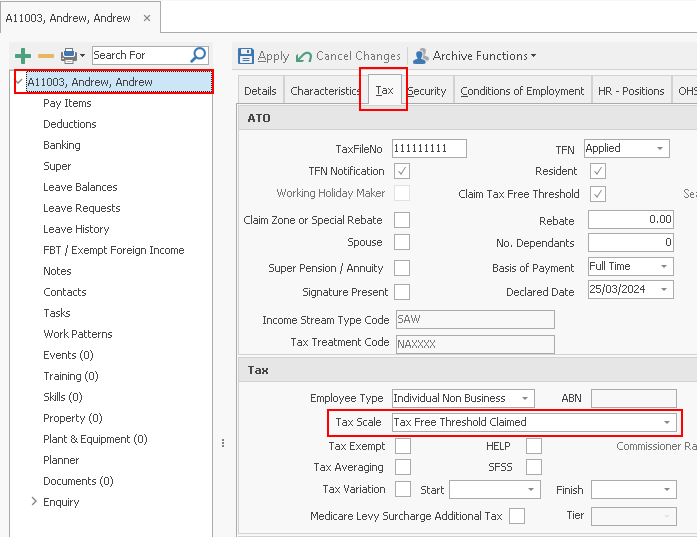
Tax Variations:Upon receiving official notification from the ATO of a variation to an employee's tax rate, you can apply a varied tax rate for a specified duration. To do this you should:
- Open the employee file using an F3 search or the Employee list on the right.
- With the employee's name selected on the left, click the Tax tab on the right.
DO NOT change the employee's Standard tax scale. The payrun reverts to this tax scale when the variation expires (see step 6). - In the lower half of the screen, select the Tax variation box.
- Enter the Start date as advised by the ATO.
The variation will take effect on the first payrun on or after the start date. - Enter the Finish date as advised by the ATO.
Most variations expire on June 30th of the current financial year. The payrun will continue processing the variation until the Payrun period end date is later than the Finish date. - Enter the Varied tax rate as advised by the ATO.
The payrun will use this rate for calculation of automatic tax for the duration of the variation. In the first payrun with a period end date later than the finish date, the system will revert to using the Tax scale selected above.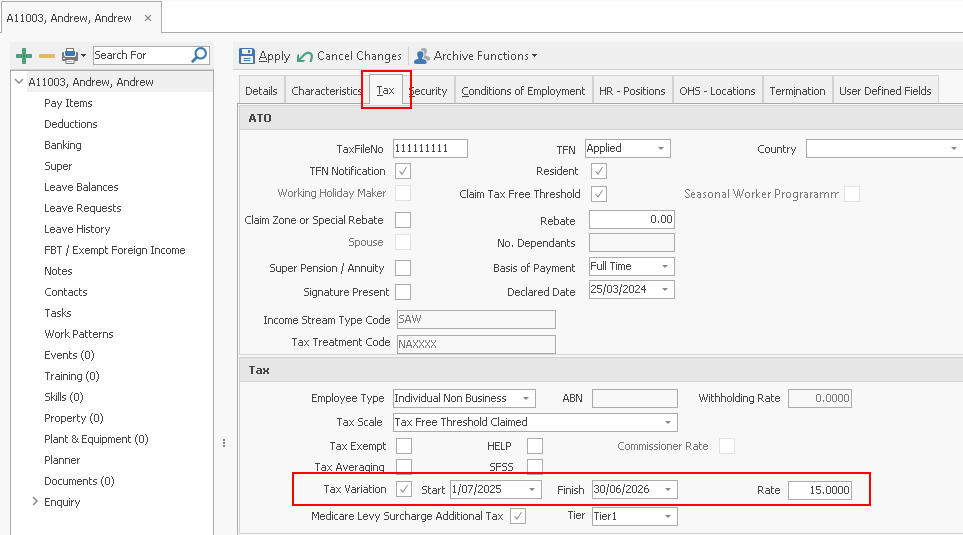
Tax Scales Wizard:
You will never need to enter tax scales manually. Whenever the ATO release new tax scales, the Ready Pay team will release a program update containing the new scales.
This is usually as part of the End of Financial year process. The latest tax scales are always available to download from the Ready Pay Web link.
Updating tax scales affects only the current company. This means that if you have more
than one company in your database, you can safely perform each company update
separately.
To update your tax scales at the end of a financial year, use the year end wizard. To update tax scales in a new company, use the Company creation wizard. At other times, you can use the Tax Scales Wizard using one of the two methods outlined below:
Download from the Web
- From the Navigator select Company Definitions > Maintain Tax Rates.
- The Tax Scales window opens on screen.
- In the toolbar on the right, click the Download button. (If you cannot see the button, you may need to enlarge your window.)
The Tax Scales Install Transfer Wizard opens at Download tax scale from the web selected.
- Click Next
to proceed.
The wizard automatically links to the Ready Pay website and displays a list of available tax scales. - Click on the required Date then click on Download to begin downloading the attached
scale. A transfer window shows the process occurring.

- Click OK when complete
to close the wizard.
Installing from a FileDepending on your Internet configuration, you may not be able to download tax scales from within the tax scales wizard. If this is the case, use the following procedure.
You will need to contact Ready Pay support to ask for the Tax Scale file (.wlt file) to be sent to you.
Once you receive it save it to a folder on your PC that you can access. Example: TaxScales2025.wlt
- From the Navigator select Company Definitions > Maintain Tax Rates.
- The Tax Scales window opens on screen.
- In the toolbar on the right, click the Download button. (If you cannot see the button, you may need to enlarge your window.)
The Tax Scales Install Transfer Wizard opens , select the radio button Import Tax Scale from a file. - Click Next to proceed.

- Click on the Browse button and navigate to the location you saved the .wlt file.
Note the Fileame Location below is an example only.
- Click Next. The File based install will begin.
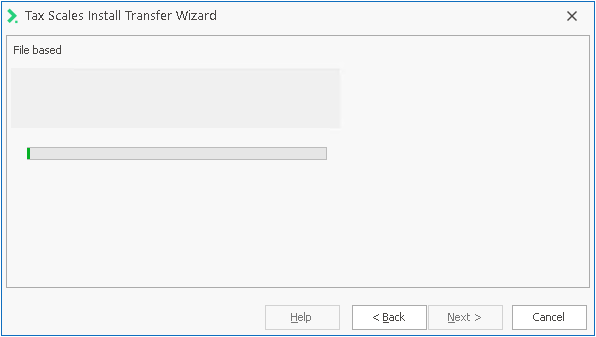
- Click OK when completed to close the Wizard